Key points
- A 4x6 label at 203 dpi is 812 x 1218 dots; plan sections on that grid.
- Use horizontal rules (^GB) to separate sender, recipient, routing, barcode and references.
- Give the tracking barcode a module width of 3 or 4 and a generous height.
- Carrier labels must follow the carrier’s own specification; use this as a learning template.
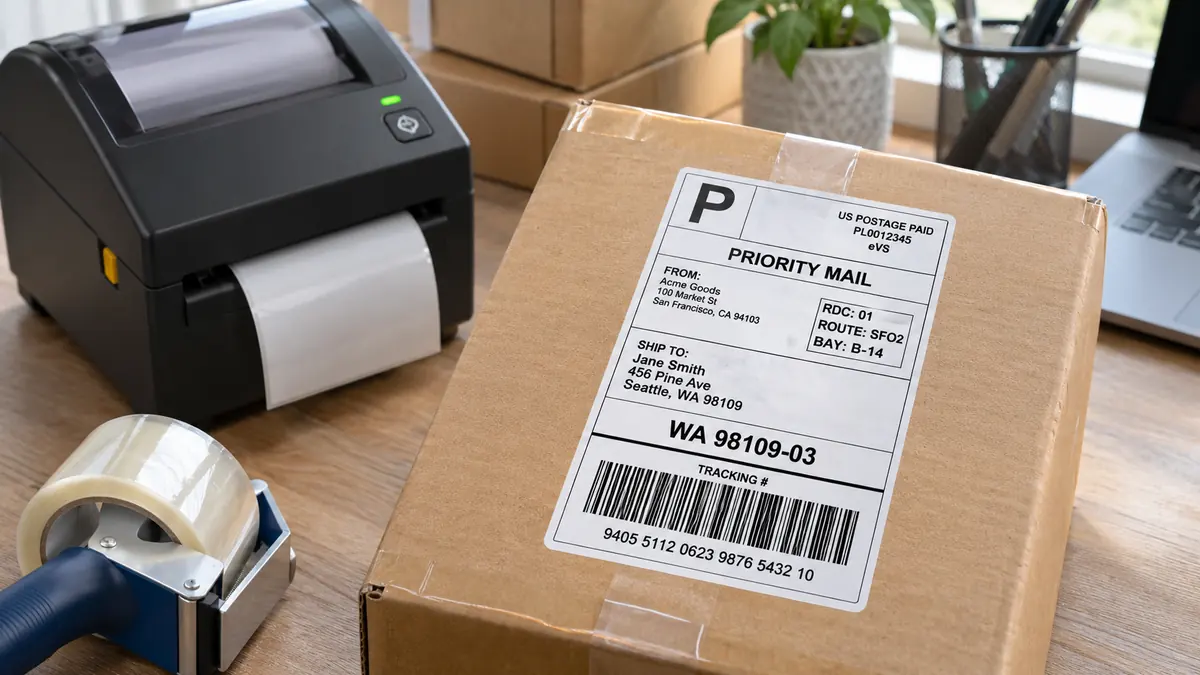
The 4 x 6 inch label is the standard for parcel shipping in the US. Building one by hand is the best way to learn ZPL, because it uses text, lines, a reversed box, a 2D code and a long linear barcode. This walkthrough builds the label below section by section. Open it in the viewer and follow along.
Real carrier labels have strict specifications for content, barcode type and placement, and are usually generated by the carrier's API. Use this example to learn ZPL and to build internal or test labels.
Plan the grid
At 203 dpi the label is 812 dots wide and 1218 dots tall. We keep a 40 dot margin on the left and use rules 732 dots long (812 minus two margins). Sections stack vertically: sender (0 to 115), recipient (115 to 375), routing (375 to 585), tracking barcode (585 to 920) and references (920 to the bottom). Writing these boundaries down first prevents overlaps later.
1. Sender block
^CF0,28 sets a modest default font, then two fields print the sender's name and address. A 3 dot rule at y 115 closes the section.
2. Recipient block
The recipient matters most, so it gets a larger font. ^CF0,50 changes the default for the next three fields. The label "SHIP TO:" stays small so the address stands out.
3. Routing and service
A filled box (^GB240,170,170) with reversed text (^FR) shows the destination state in white on black, which is easy to spot on a conveyor. Service, weight and package count sit to the right, and a small QR code carries the order number for internal scanning.
4. Tracking barcode
^BY4,3,230 sets a 4 dot module width and 230 dot height. Mode A in ^BC lets the printer compress the 22 digit number into subset C, so it fits comfortably within the 812 dot width with quiet zones on both sides. Check the barcode width in the preview: hover it to see where it starts and ends.
5. References
Order number, customer reference and ship date close the label. These are useful for returns and customer service.
^XA
^PW812
^LL1218
^FX 1. Sender
^CF0,28
^FO40,40^FDFROM: Northgate Outfitters^FS
^FO40,75^FD415 Pine Street, Boulder, CO 80302^FS
^FO40,115^GB732,3,3^FS
^FX 2. Recipient
^CF0,30
^FO40,140^FDSHIP TO:^FS
^CF0,50
^FO40,180^FDDaniel Ortiz^FS
^FO40,240^FD2280 Lakeshore Blvd^FS
^FO40,300^FDChicago, IL 60614^FS
^FO40,375^GB732,3,3^FS
^FX 3. Routing and service
^FO40,395^GB240,170,170^FS
^FO70,425^FR^A0N,120,100^FDIL^FS
^FO310,400^A0N,40,40^FDGROUND^FS
^FO310,450^A0N,30,30^FDWeight: 2.8 lb^FS
^FO310,490^A0N,30,30^FDPackage 1 of 1^FS
^FO600,395^BQN,2,4^FDMA,ORD-55210^FS
^FO40,585^GB732,3,3^FS
^FX 4. Tracking barcode
^BY4,3,230
^FO80,620^BCN,230,Y,N,N,A^FD9400111202555842210041^FS
^FO40,920^GB732,3,3^FS
^FX 5. References
^CF0,32
^FO40,950^FDOrder: ORD-55210^FS
^FO40,995^FDRef: Spring catalog^FS
^FO40,1040^FDShip date: 2026-09-20^FS
^XZ
Adapting the template
- 300 dpi printers: multiply every coordinate and size by 1.5 (300 / 203 is about 1.48), or generate coordinates from millimetres in your software.
- Long addresses: wrap the street line in a field block such as
^FB732,2,0,Lso it never runs off the edge. - International labels: add
^CI28and make sure the printer has a font with the needed characters. See special characters in ZPL. - Return labels: use the same structure on a 4 x 2 label; the online viewer walkthrough has an example.
Final checks
- Preview in the ZPL Viewer at 8 dpmm and 4 x 6 in.
- Scan the tracking barcode and QR code from the screen.
- Test the longest names and addresses you expect.
- Print one label and check it under the scanners your team uses.
Preview this in the ZPL Viewer
Paste your code, pick the label size and density, then check every field before you print.
Frequently asked questions
How many dots wide is a 4x6 label?
At 203 dpi it is 812 dots wide and 1218 dots tall. At 300 dpi it is 1200 by 1800 dots.
Which barcode do shipping labels use?
Most US parcel tracking numbers are encoded as Code 128, and many carriers add a 2D code such as a Data Matrix, MaxiCode or PDF417. Follow your carrier’s specification.
Can I print this label on a 300 dpi printer?
Yes, but scale every coordinate and size by about 1.5, or the content will only fill two thirds of the label.
Why does my tracking barcode not fit?
Reduce the module width in ^BY, use mode A or subset C for numeric data, or move the barcode to start closer to the left margin.
Sources and further reading

Written by the ZPL Viewer Editorial Team
We build and maintain the ZPL Viewer rendering engine and write these guides from real testing of label code. Every example in this article was rendered in our viewer before publishing. Read more about how we work.