Key points
- ZPL (^XA ... ^XZ) is Zebra’s main language for desktop and industrial printers.
- EPL (lines like N, A and P1) came from Eltron and is common on older desktop printers.
- CPCL (starts with !) is used mainly on Zebra mobile printers.
- Many current printers can switch languages; a ZPL viewer only renders ZPL.
If you have inherited a label system, the first question is which language it speaks. Zebra printers have used three main command languages over the years, and they look nothing alike. Here is how to recognise each, where you will meet them and what to do if you need to change.
The three languages at a glance
| Language | Looks like | Typical printers |
|---|---|---|
| ZPL / ZPL II | Commands with ^ and ~, labels between ^XA and ^XZ | Most Zebra desktop and industrial printers; many compatible brands |
| EPL / EPL2 | One command per line, such as N, A50,50,..., P1 | Older Zebra desktop models from the Eltron line, such as the LP and TLP 2844 series |
| CPCL | Starts with !, words like TEXT, BARCODE, PRINT | Zebra mobile printers, often as the default language |
ZPL
ZPL is the language this site is about and the one most new systems should use. It is supported across Zebra's current desktop and industrial range, and carriers, marketplaces and warehouse systems commonly offer ZPL output.
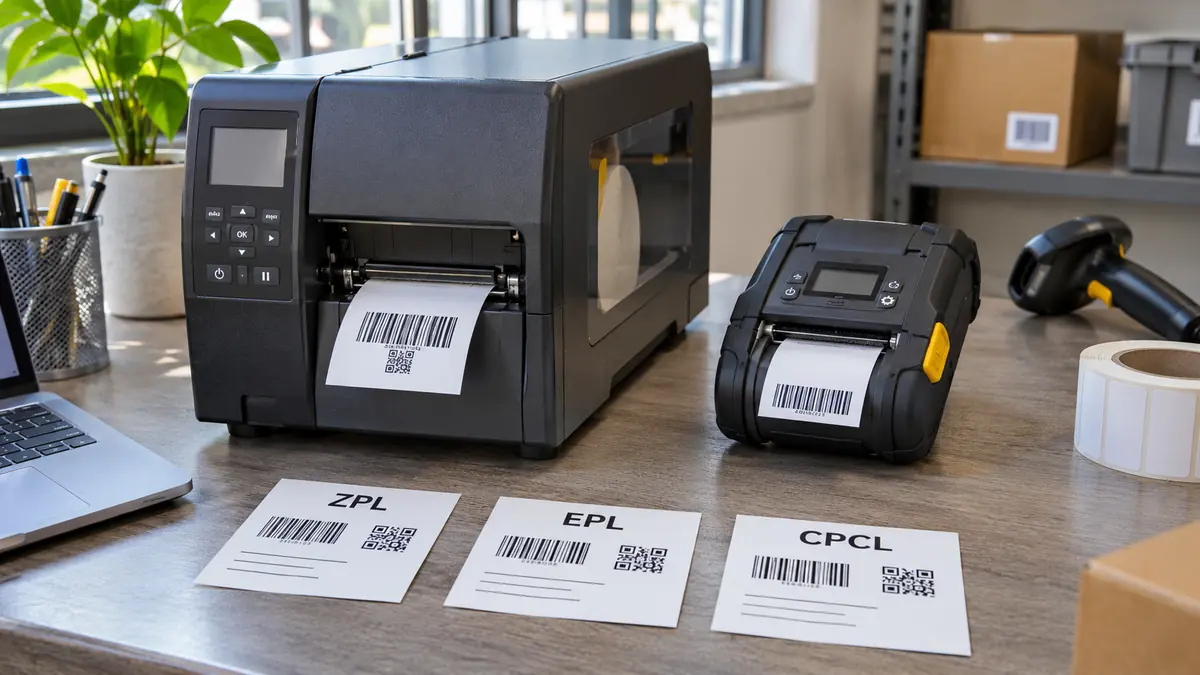
^XA
^PW812
^LL406
^FO30,30^A0N,40,40^FDZPL^FS
^FO30,80^FH^A0N,26,26^FD_5EXA ... _5EXZ^FS
^FO290,30^A0N,40,40^FDEPL^FS
^FO290,80^A0N,26,26^FDN ... P1^FS
^FO550,30^A0N,40,40^FDCPCL^FS
^FO550,80^A0N,26,26^FD! 0 200 200 ...^FS
^FO30,130^GB752,3,3^FS
^BY2,3,110
^FO30,170^BCN,110,Y,N,N^FDZPL-EPL-CPCL^FS
^XZ
EPL
EPL came from Eltron, which Zebra acquired. EPL2 is line based: N clears the image buffer, A draws text, B draws a barcode and P1 prints one copy.
N
q812
A50,50,0,4,1,1,N,"Hello EPL"
B50,100,0,1,2,6,100,B,"12345"
P1
Some newer Zebra desktop printers can still understand EPL through emulation or a language setting, which keeps older systems running.
CPCL
CPCL was designed for portable receipt and label printers. A label starts with a header line beginning with ! that gives offset, resolution, height and quantity, followed by commands and PRINT.
! 0 200 200 210 1
TEXT 4 0 30 40 Hello CPCL
BARCODE 128 1 1 50 30 90 12345
PRINT
Many Zebra mobile printers can also accept ZPL, which helps when the same software prints to desktop and mobile devices.
How to tell what a file contains
- Contains
^XA: ZPL. Open it in the ZPL Viewer. - Starts with
Norqon its own line and ends withP1: EPL. - Starts with
!followed by numbers: CPCL. - Binary data or
%PDF: not a printer command file at all.
Our viewer flags EPL and CPCL content as having no ZPL labels, so you know straight away that you need a different tool or a conversion.
Switching a printer's language
Link-OS printers have a device language setting that can be changed through Zebra's setup utilities, the printer's web page or a command. If a printer suddenly prints your ZPL as text, its language may have been switched to line print or another mode. Check the configuration label.
Should you migrate to ZPL?
For new projects, yes: ZPL has the widest support and the richest feature set. For working EPL or CPCL systems, migration is worth it when you replace printers, need features such as 2D barcodes or stored formats, or want one template across printer types. Rewrite labels field by field and compare each new ZPL label against a print of the old one.
Preview this in the ZPL Viewer
Paste your code, pick the label size and density, then check every field before you print.
Frequently asked questions
Can a ZPL viewer display EPL or CPCL?
No. The languages use different syntax. A ZPL viewer will report that it found no ZPL labels. Convert the label to ZPL or use a tool for that language.
Is ZPL II different from ZPL?
ZPL II is the current version of the language and is what people usually mean by ZPL today. Most original ZPL commands work unchanged in ZPL II.
How do I convert EPL to ZPL?
There is no exact automatic mapping, because fonts and barcode parameters differ. Rebuild the label in ZPL using the same positions and data, then compare prints.
Which language do Zebra mobile printers use?
Many default to CPCL and can also accept ZPL. Check the configuration report of your model to see which languages it supports and which is active.
Sources and further reading

Written by the ZPL Viewer Editorial Team
We build and maintain the ZPL Viewer rendering engine and write these guides from real testing of label code. Every example in this article was rendered in our viewer before publishing. Read more about how we work.